
The goal of cobaltResume is to create professionally-looking resumes and cover letters in RStudio. LaTeX code has been written in the cobaltResume.cls, cobaltCoverLetter.cls, cobaltResume.tex, and cobaltCoverLetter.tex files to format the resume and cover letter files. I have written my own resume and cover letter using cobaltResume, which can be viewed my resume. Note that the cover letter is populated with placeholder content. In the five sections that follow, I will explain the components to using cobaltResume:
- Installation
- Project creation
- Creating a resume
- Creating a cover letter
- Merging the resume and cover letter into one PDF file
1) Installation
You can install the development version of cobaltResume GitHub and load it into your session with:
#install.packages("devtools")
devtools::install_github("sebsciarra/cobaltResume")
library(cobaltResume)
2) Project creation
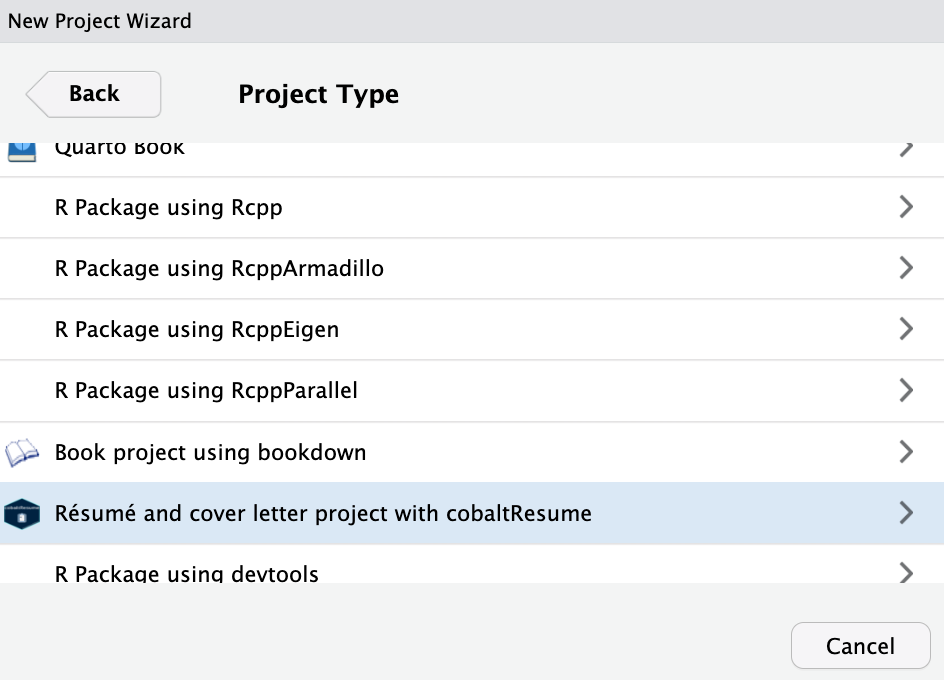
To create a cobaltResume template, click on File > New Project > New Directory. Then select Résumé and cover letter project using cobaltResume from the dropdown menu as shown below.
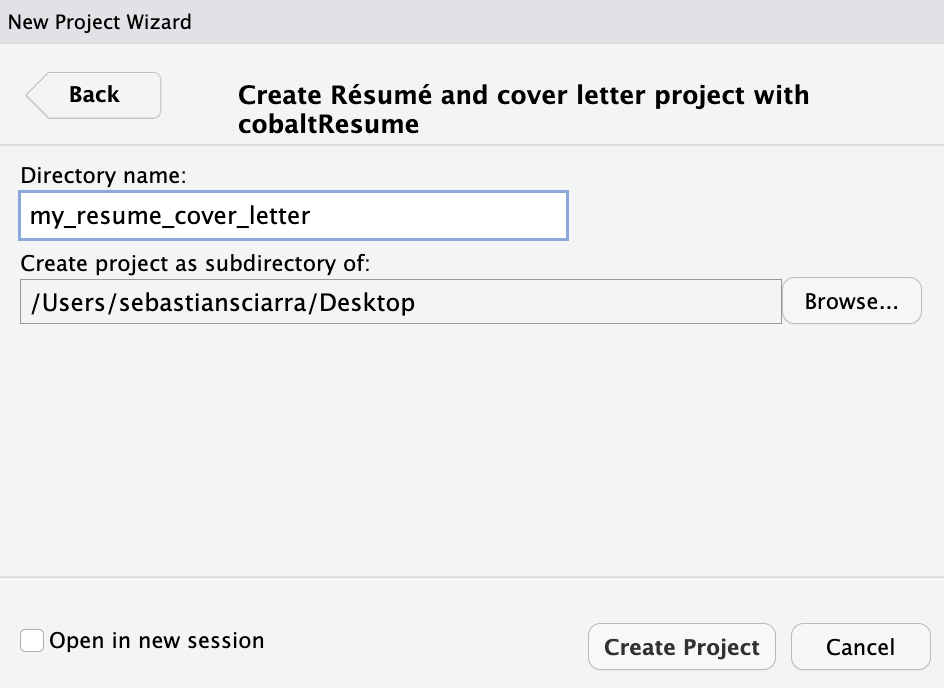
THen, give your project a name and specify where you’d like the files to appear. In the screenshot below, the project name is my_resume_cover_letter will appear as a new folder on the Desktop.
3) Creating a resume
In the resume.Rmd file, a resume can be completed by using three features. First, information related to identification and skills can be included in the resume by filling in the appropriate YAML header variables shown below.
firstName: "firstName"
lastName: "lastName"
position: "Position" #job position being applied to
date: "date"
output:
  pdf_document:
    template: "cobaltResume.tex" #template file (do not change)
#hyperlinks (delete or leave blank blank if not necessary/do not exist)
#escape any special characters with two backslashes (for example, see email variable)
githubLink: "github.com/user" #link to GitHub
githubName: "githubHandle" #GitHub username
personalWebsite: "personalwebsite.com"
linkedinName: "firstName lastName"
linkedinLink: "linkedin.com/in/personal_link"
email: "email\\@domain.com"
#skills + citizenship
skills: "R, SQL, Python, LaTeX, Bash, HTML, JavaScript, CSS, Machine learning, Data science, Data visualization, Knowledge translation" #skills relevant to the job
citizenship: "Citizenship status" #e.g., work permit/study permit/Permanent resident/citizen, etc.
Second, sections can be created in the resume.Rmd file and accessorized with fontawesome icons (for a full list, see fontawesome icons). For example, \faSuitcase\ Employment results in the header shown below.

Third, résumé entries can be completed using create_resume_entry(). Two examples are provided below.
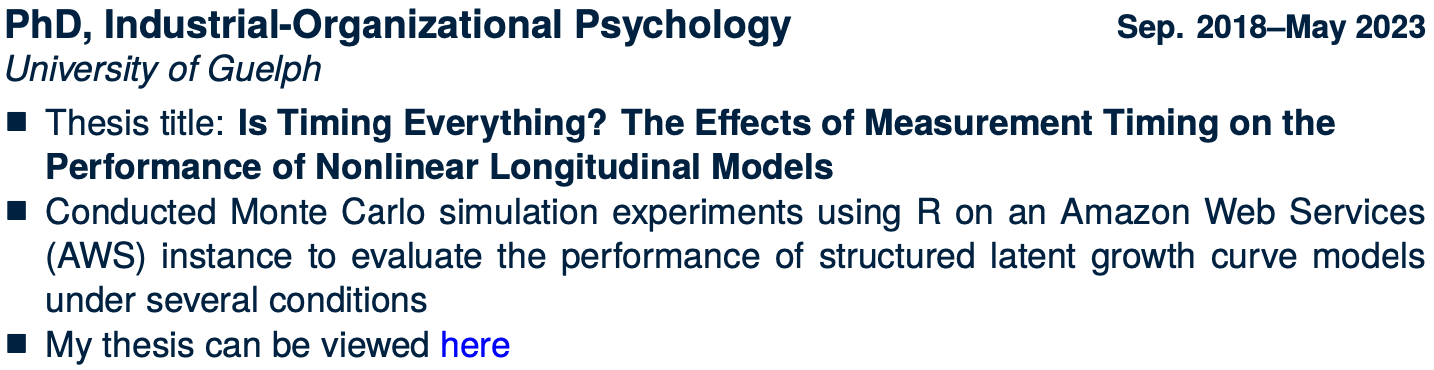
create_resume_entry(title = "PhD, Industrial-Organizational Psychology",
                 subtitle = "University of Guelph",
                 date = "Sep. 2018--May 2023",
                 first_point = "Thesis title: \\textbf{Is Timing Everything? The Effects of Measurement Timing on the \\newline Performance of Nonlinear Longitudinal Models}",
                 second_point = "Conducted Monte Carlo simulation experiments using R on an Amazon Web Services (AWS) instance to evaluate the performance of structured latent growth curve models under several conditions",
                 third_point = "My thesis can be viewed  \\href{\\detokenize{https://atrium.lib.uoguelph.ca/xmlui/bitstream/handle/10214/27543/Sciarra_Sebastian_202304_PhD.pdf?sequence=1&isAllowed=y}}{\\textcolor{blue}{here}}")

create_resume_entry(title = "\\href{sebastiansciarra.com}{sebastiansciarra.com}\\footnote{clickable hyperlink to the corresponding repository on my GitHub}", subtitle = "Personal website", date = "Mar. 2023",
                 first_point = "Used HTML, JavaScript, and CSS to create a personal website for writing blog posts",
                 second_point = 'Blog posts focus on statistics, machine learning, and coding by explaining technical details, providing demonstrations, and conducting simulation experiments',
                 third_point = 'Blog posts use code from a variety of language to explain content. As an example, my post titled ``\\href{https://sebastiansciarra.com/coding_tricks/em_demo/}{\\textcolor{blue}{Coding and Visualizing the Expectation-Maximization Algorithm}}" used R, Python, and CSS code')
Note that LaTeX code can be inserted and will be rendered. The above two examples produce the following two entries in the resulting PDF file:
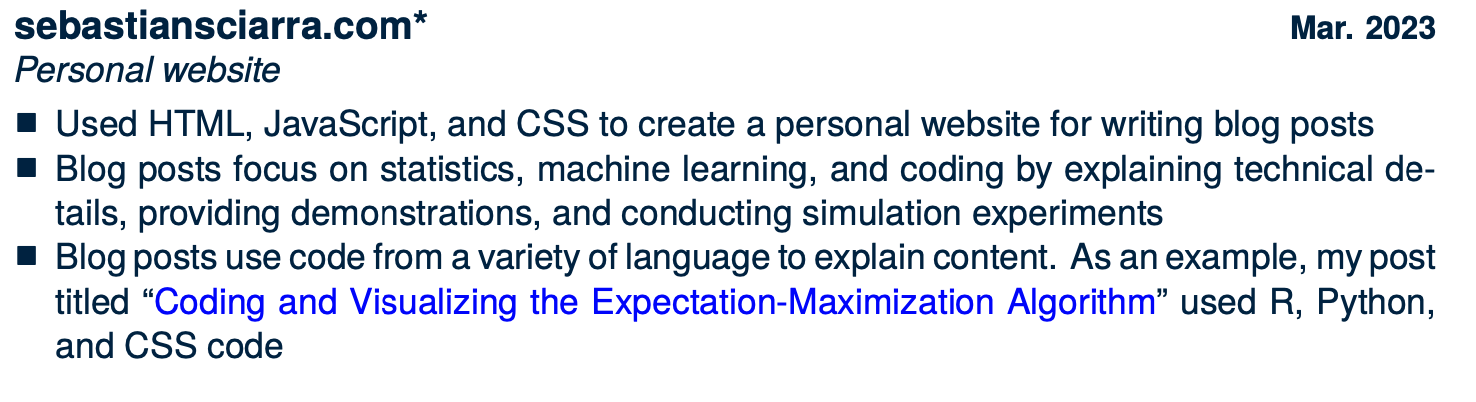
As an aside, there is an asterisk at the end of the personal website, because it is a clickable hyperlink to the corresponding GitHub repository. This not shows up as a footnote, as shown below.

4) Creating a cover letter
In the cover_letter.Rmd file, a cover letter can be completed by using three features. First, information related to identification and skills can be included in the résumé by filling in the appropriate YAML header variables shown below.
firstName: "firstName"
lastName: "lastName"
position: "Position" #job position being applied to
date: "date"
output:
  pdf_document:
    template: "cobaltCoverLetter.tex"
hyperlinks (delete or leave blank blank if not necessary/do not exist)
#escape any special characters with two backslashes (for example, see email variable)
githubLink: "github.com/user" #link to GitHub
githubName: "githubHandle" #GitHub username
personalWebsite: "personalwebsite.com"
linkedinName: "firstName lastName"
linkedinLink: "linkedin.com/in/personal_link"
email: "email\\@domain.com"
#recruiter info
recruiterName: "Recruiter Name"
organization: "Organization Name"
organizationStreet: "200 Bay St."
organizationCityPostal: "Toronto, ON M5J 2J2"
#greeting/closing + citizenship
greeting: "Dear Mr./Mrs. Recruiter Name"
emailClosing: "Sincerely"
citizenship: "Citizenship status" #e.g., work permit/study permit/Permanent resident/citizen, etc.
5) Merging the resume and cover letter into one PDF
To merge the resume and cover letter into one PDF, make sure that each .Rmd file exists in its own folder (as is the case when the project is first created). With the resume and cover letter .Rmd files in their own folders, they can be merged by specifying the knit YAML variable in either the resume.Rmd and/or the cover_letter.Rmd file(s) such that
knit: cobaltResume::merge_resume_cover_letter